JJUG CCC 2013 Spring の発表資料について
本日、JJUG CCC 2013 Spring が開催されました。Oracle からはUS Oracle Corporation からJim Weaver (Twitter : @JavaFXpert) が基調講演で「What’s New for JavaFX in JDK 8」を発表し、午後一のセッションで、「Java EE 6 から Java EE 7 に向かって」というセッションを担当しそれぞれ発表しました。2人の発表資料を公開しましたのでご報告します。
(※ 私のプレゼン資料ですが、SlideShare にアップロードした際、SlideShare 側の問題で、フォントが無いせいか、私が使用しているオリジナル・フォントからは変わって表示されています。その点ご了承頂ければ幸いです。)
基調講演-2 What’s New for JavaFX in JDK 8
H-1 Java EE 6 から Java EE 7 に向かって
今日の私のプレゼン中で行った EL(Expression Language) 3.0のデモのソース・コードも下記に公開します。デモ用に簡単に作ったものであるため、本来 JPA で DB 接続すべき所を簡単にダミーデータ(Person#createDummyData())を作成しています。
本コードは JSF 2.0 と CDI をご存知の方であれば容易にご理解いただけるかと思いますが、「全データ抽出」のボタンを押下すると、CDI の getAllData() が呼び出され、indexManagedBean.data(ArrayList) に全データがコピーされ、その一覧が dataTable に表示されます。
次に、「年齢フィルタ」のテキストフィールド(デフォルト:0)に対して年齢を入力すると、入力された年齢以上のデータを表示しています。内部的には Ajax を使って、入力された年齢情報(indexManagedBean.ageFileter)をサーバに送信し、Ajax のリスナーとして定義しているindexManagedBean.updateData()を実行していいます。ただ、indexManagedBean.updateData()は処理は何もしていません、ここでは execute=”ageFilter” をサーバに送信し、その結果を render=”tabledata” 、つまり dataTable の内容を更新するためだけにupdateData()を呼び出しています。
<h:dataTable id="tabledata" value="#{afilter = indexManagedBean.ageFileter;indexManagedBean.data.stream().filter(p-> p.age >= afilter).toList()}" var="person" border="1">
この例では、一度 DBに対してクエリを実行し、その結果をコレクションにコピーした後、さらにそのコピーしたデータに対して絞り込みを行っています。DB に対して再度クエリをなげるのではなく、EL 3.0 の Lambda 式を使って、一旦取得したデータを元に再フィルタリングを 行っています。
セッション中でも話をしましたが EL 3.0 で Lambda 式(及び LINQ 式)が使えるようになった事でビューにロジックを埋め込む事が可能になりますが、あまりやりすぎると可読性の低下にもつながりますので使う範囲はよくご検討頂いた方がよいのではないかと思います。(※ .Net の LINQ 式は DB に対しても操作可能ですが、EL 3.0 における LINQ 式はコレクションに対してのみ有効です。)
今回の例では、一旦取得したデータのフィルタンリグ等でご使用頂く事で、DB に対する負荷、インメモリ・グリッドにあるキャッシュから取得するよりもパフォーマンスがよくなる事を想定し記載しています。なぜならばヒープメモリ内にあるデータを直接操作する方がパフォーマンス的に優れるためです。(※ コレクションに対して有効な操作である事をご認識頂き用途は十分にご検討ください。)
<?xml version='1.0' encoding='UTF-8' ?>
<!DOCTYPE html PUBLIC "-//W3C//DTD XHTML 1.0 Transitional//EN" "http://www.w3.org/TR/xhtml1/DTD/xhtml1-transitional.dtd">
<html xmlns="http://www.w3.org/1999/xhtml"
      xmlns:f="http://java.sun.com/jsf/core"
      xmlns:h="http://java.sun.com/jsf/html"
      >
    <h:head>
        <title>Facelet Title</title>
    </h:head>
    <h:body>
        <h:form>
            <h:commandButton value="全データ抽出" action="#{indexManagedBean.getAllData()}"/><br/>

            <h:outputLabel value="年齢フィルタ"/>:
            <h:inputText id="ageFilter" value="#{indexManagedBean.ageFileter}" autocomplete="off">
                <f:ajax event="keyup" execute="ageFilter" render="tabledata" listener="#{indexManagedBean.updateData()}"/>
            </h:inputText>

            <h:dataTable id="tabledata" value="#{afilter = indexManagedBean.ageFileter;indexManagedBean.data.stream().filter(p-> p.age >= afilter).toList()}" var="person" border="1">
                <h:column>
                    <f:facet name="header">
                        <h:outputText value="名前"/>
                    </f:facet>
                    <h:outputText value="#{person.name}"/>
                </h:column>
                <h:column>
                    <f:facet name="header">
                        <h:outputText value="年齢"/>
                    </f:facet>
                    <h:outputText value="#{person.age}"/>
                </h:column>
                <h:column>
                    <f:facet name="header">
                        <h:outputText value="性別"/>
                    </f:facet>
                    <h:outputText value="#{person.sex}"/>
                </h:column>
            </h:dataTable>
        </h:form>
    </h:body>
</html>
package jp.co.oracle.ee7samples.cdi;

import java.util.ArrayList;
import javax.faces.view.ViewScoped;
import javax.inject.Named;
import jp.co.oracle.ee7samples.model.Person;

@Named
@ViewScoped
public class IndexManagedBean {

    private ArrayList data;
    private Integer ageFileter;

    public ArrayList getData() {
        return data;
    }

    public void setData(ArrayList data) {
        this.data = data;
    }

    public Integer getAgeFileter() {
        if (ageFileter == null) {
            return new Integer(0);
        }
        return ageFileter;
    }

    public void setAgeFileter(Integer ageFileter) {
        this.ageFileter = ageFileter;
    }

    public String getAllData() {
        setData(Person.createDummyData());
        return "";
    }

    public String updateData() {
        return "";
    }
}
デモの中でもお伝えしましたが、本来 JPA で DB に接続して Person Entity に対して全レコードを抽出するコードを書く方が現実的なのですが、EL 3.0 は本来 Collection を対象とする事をわかりやすくするため、JPA を使わずに自分でダミーのデータをcreateDummyData()で作成しています。
package jp.co.oracle.ee7samples.model;

import java.util.ArrayList;

public class Person {
    private String name;
    private Integer age;
    private String sex;

    public String getName() {
        return name;
    }

    public void setName(String name) {
        this.name = name;
    }

    public Integer getAge() {
        return age;
    }

    public void setAge(Integer age) {
        this.age = age;
    }

    public String getSex() {
        return sex;
    }

    public void setSex(String sex) {
        this.sex = sex;
    }

    public static ArrayList createDummyData() {
        ArrayList<Person> data = new ArrayList<>();
        Person person;
        for (int i = 0; i < 100; i++) {
            person = new Person();
            person.setAge(Integer.valueOf(i));
            if (i % 2 == 1) {
                person.setName("山田 太郎" + i);
                person.setSex("男性");
            } else {
                person.setName("山田 花子" + i);
                person.setSex("女性");
            }
            data.add(person);
        }
        return data;
    }
}
Java Puzzlers って何?!サンプル問題の解答
先日、Java Puzzlers のサンプル問題を下記エントリでご紹介しました。
この問題の解説を行います。
結論から言うと、正解は(3)です。皆様正解できましたか?
一見すると
1行目:12345678 + 87654321 = 99999999
2行目:01_234_567 + 76_543_210 = 77777777
となりそうなので、答え(2)を選んでしまう方もいらっしゃるかもしれません。
もしくは12_345_678のように、 _ (アンダースコア)が付いたリテラルに対して加算しているのでコンパイルエラーになると考え(5)を選ばれる方もいらっしゃるかもしれません。数値の間に _ (アンダースコア)が入る事は Java SE 7(Project Coinで) からできるようになりました。このアンダースコアは、数字データの可読性の向上のために自由に使っていただく事ができます。つまり(5)でもありません。
次に、回答(1)を選んだ方は、2行目の部分は気づいた方ではないでしょうか。2行目の先頭に 0 がついていますが、Java では 8進数表記になります。8進表記で 1234567 は 10 進表記では 342391 になります。つまり、10 進数で計算しなおすと下記のようになります。
342391+76543210=76885601
ここまで分かった場合、残った答えは (1) か (3) にしぼられるのですが、このプログラム実はもう一つ落とし穴があります。
1行目の、87_654_32l と記載されている所ですが、実は最後の文字は1(イチ) ではなく l (long:小文字のエル) なのです。
つまり、12345678 + 8765432 = 21111110 となり答えは (3) となります。Primitive の long 型を扱う場合には、混乱を招かないように l(小文字のエル)ではなく、L(大文字のエル)を使いましょうね!!
と、このようなやりとりをパズラーの登壇者がおもしろおかしく、そして分かりやすく紹介します。
パズラーが出す質問に、皆様何問回答できますか? (^_^)
是非、チャレンジしてみてください。
Java Puzzlers って何?!サンプル問題
Java Day Tokyo 2013 の中で「帰ってきた Java パズラー」というセッションを 16:45 – 17:35 の時間帯で実施します。
皆様、Java パズラーをご存知でしょうか?
もしかしたら、特に若い方々はこのセッションの内容についてご存じないかと思い少し、本ブログですこしご紹介します。このセッションは過去、本場 JavaOne でとても人気のあったセッションで、このセッションは常に満員になるほどの名物セッションでした。その後、「Java Puzzlers 罠、落とし穴、コーナーケース」という書籍もでてベストセラーにもなりました。
このセッションでは、どんな事をするかというと、簡単にいうならば、参加型のクイズ形式のセッションになります。単なるクイズ・セッションではなくおもしろい要素もあります。
セッションでは、登壇者が皆様に質問を出します。
「下記の Java のプログラムを実行すると何が表示されるでしょうか?」
public class Test {
    public static void main(String[] argv) {
        System.out.println(12_345_678 + 87_654_32l);
        System.out.println(01_234_567 + 76_543_210);
    }
}
* 下記の 5 択の中から正解を選んでください。
(1) 99999999 76885601
(2) 99999999 77777777
(3) 21111110 76885601
(4) 21111110 77777777
(5) コンパイルエラー
※ 本、ブログをご覧頂いた皆様、コンパイルして実行せずに、コードのレビューだけで、正解を導きだしてみてください!!正解は、明日追記します。
実際、当日は実際に考える時間はあまりありません。短い時間の中でコードレビューをして、正しいと思う番号に手をあげて皆様は参加します。うっかりしていると間違えてしまう点や、見落としがちな点をご紹介します。このセッションは、JJUG(日本 Java ユーザ・グループ) の協力を得て、日本オリジナルで Java SE 7, Java SE 8 に対応した問題をみなさまに提出いたします。Java の初心者から玄人の皆様すべてが楽しんでいただけるこの参加型セッション、ぜひみなさまご参加ください。
Java Day Tokyo 2013 開催のお知らせ

本日は、日本オラクル主催の Java イベントについて下記にご案内をさせて頂きます。
イベント概要:
Java Day Tokyo 2013
- Make The Future Java –
主催:日本オラクル株式会社
日程:2013 年 5 月 14 日(火)
会場:秋葉原 UDX
参加費:無料
お申し込み登録サイト:
http://www.oracle.co.jp/jdt2013/
Twitter ハッシュタグ:#jdt2013
昨年、JavaOne Tokyo 2012 を六本木ヒルズで開催し、数多くの Java の開発者の皆様にご参加頂きました。今年こうして Java Day Tokyo のイベントを開催できるのも一重に昨年、日本全国からご参加頂いた、全ての Java 開発者の皆様のおかげです。
JavaOne Tokyo が終わった後も、またやってほしいというご要望をたくさん頂いておりました。
http://togetter.com/li/401051
これを踏まえ、今年も最新トレンドをお届けする事が可能となりました。Oracle の本社から多くのエンジニアを招いて丸一日 Java のお祭りを開催しますので、是非楽しみにしてください。
皆様のご参加を心よりお待ち申し上げます。
日本オラクル 寺田
Java に対するさまざまな貢献について – Part 2
 先日のエントリは、どちらかというと既に Java で長年開発に携わってきた方が、Java に対して何らかの貢献をしたい場合、とっかかりとして、どこから手をつければよいのかをご紹介する内容になっていました。このような方々には、ちょっとしたきっかけ、もしくは情報をお届けする事で自らがどんどん情報を収集して御活動頂けるので、その点で前回の記事は参考にして頂けるのではないかと思います。
ただ、その一方で、私はもっと若い方々(20代-30代前半の方々)、もしくは今まで Read-Only だった方々にも、もっともっと表に出てきて頂きたいと感じております。(私も 40 になり既に若くはないので。(^^;))
例えば、今年も Developers Summit 2013 が目黒雅叙園で開催されましたがタイムテーブルを見ると数多くの有識者が発表をしてらっしゃいます。でも、ここで発表頂いている方々は最初からこういった場に出てきて話をしているのでしょうか?おそらく、様々なコミュニティに参加し、そういった場で発表経験を重ねた後に、このようなイベントの壇上に立っていらっしゃっるのではないかと思います。日本にも全国にわたって、Java コミュニティ、もしくは IT の勉強会があります。是非、気負う事なくこういった場に出てこられて、単に Read-Only を続けるだけでなく、将来ご自身で発表をする事もご検討ください。
もちろん、人前に出て話をする事が苦手という方もいらっしゃるでしょう。上記は私の経験を元に記載しているので、人前に出てプレゼンという例を出していますが、誤解して頂きたくないのは、人前に出て話をする事が決してゴールではありません。本質的にお伝えしたい事は、ご自身の持っている技術力を世の中にアピールする事、もしくは社外にいる優秀な方々とお友達になる事は、技術者(人間)として成長していく過程でとても重要な事ではないかと思う事です。仮にご自身が今いらっしゃる会社を転職されたい場合に、次の会社の面接で「どのような事をなさってきましたか?」と聞かれた際に、社外で何らかの活動をされていらっしゃると「こんな事をしてきました」と説明しやすくなるのではないかと思いますし、最近ではコミュニティ活動で通じたご縁で転職が決まったという話も良く聞きます。つまり、ご自身の将来の活動の際にも役立つのではないかと思います。
それでは、どこから何を始めればいいのでしょう?
今回は、自分で発表するという部分を目指した場合を考えます、セミナーや勉強会の主催・企画者は、おそらくやる気のある方々が発表したいと言ってご連絡を頂いた際、とても嬉しく、喜ぶ一方で、参加者が満足する発表をしていただけるだろうかと悩む所だと思います。主催者と人間関係が無い状態、もしくはお互いの素性が全く分からない状況では、お願いするにしてもしずらい状況になってしまいますので、下記のようにブログや ML を通じて情報交換して頂き、セミナーの懇親会で主催者と仲良くなっていく事で人間関係を築き発表できるようになるのではないかと思います。(もちろん発表者を任意、もしくは Call For Papers で募集するコミュニティもありますので、そういった場にいきなりチャレンジする事も可能です)
- ご自身が試した技術や、調査した事、****の仕方、セミナー参加レポートなどをブログに書いてみる
- 恐らく、これが一番敷居が低いのではないかと思います。
- 技術セミナーに参加する
- メーリングリストで発言する
- 各コミュニティを取りまとめている方々(幹事)と仲良くなる
- セミナー終了後の懇親会に参加し発表者と仲良くなる
- 自身で勉強会を企画してみる
- 自分で発表する
最初に人前に出て話をする事はとても勇気のいる事ですし、参加頂いている方から何を言われる(通称:マサカリが飛んでくる)のか?!とてもドキドキする事でしょう。私も、30 台前半の頃に始めて人前で発表した時はとても緊張しました。でもそういう点を支えるのも、そして改善点を優しく教えるのも、またコミュニティの役割なのではないかと思います。私の場合、幸運にも、この経験を積み重ねる過程で、人生の大先輩に、私のプレゼンの良くない点を優しくご指導頂き、それを次のプレゼンで生かせるように考える事ができました。きっと同じように良い人と巡り会う事で、人間としても成長できるのではないでしょうか。
コミュニティへの参加は、ある程度の経験や実績がなければできないのか、敷居が高いのかというと、決してそんな事はなく、学生さんや新入社員、今までセミナーに参加して Read-Only だった方も色々な形で参加ができると思います。それが将来 OSS に対する貢献にも繋がっていくかと想定します。
JJUG の幹事グループも、若い方々が幹事グループに参加して頂く事を強く願っております。是非、若い方々も積極的に JJUG 幹事グループ・メンバーにお声掛けください。将来の Java のコミュニティの盛り上がりの為に、JJUG 幹事と一緒に活動して頂ける若い方を心よりお待ち申し上げます。
追伸:
本ブログエントリを書いていて、JJUG の幹事の一人として、
「若手の会」とか、
「プレゼンをした事のない方々による始めてのプレゼン」とか
「櫻庭さんによるプレゼン講座」
なんかのセミナーを企画してもよいのではと思いました。> JJUG 幹事の皆様
Java に対するさまざまな貢献について

Java に対して貢献したいのですが、どういった貢献が必要とされているのか、どのような貢献ができるのか、貢献をするためには何処から、何を始めたらいいのか?とご質問を頂きました。そこで本エントリでは Java における貢献の種類や方法についてまとめて紹介したいと思います。まず、始めにお伝えしたい事は、貢献は様々な種類がありますが、全てにおいて気構える事なく、自分で可能な範囲とお時間で貢献をして頂ければ幸いです。
それでは、Java における貢献とはどのような種類があるのでしょうか。数多く有りすぎて全てを列挙できないかもしれませんが、今思いつく所だけでも下記のような内容があります。上から下に向けて難易度は難しくなるかと思います。
- ご自身のブログ、もしくは記事の執筆、書籍の出版、各種技術セミナーでご登壇 (ご自身でできる事)
- 日本全国、各地方における勉強会の企画、開催、実施、登壇など(日本単独でできる事)
- 英語で記載された技術ドキュメントの翻訳 (java.net サイト上で)
- 英語ドキュメントの不具合の指摘(リンク切れ、スペルミスなど)、ドキュメントの改善提案、ドキュメントの作成
- クオリティ向上のための Early Access Program の不具合プログラムに参加
- 各種 ML もしくはバグ登録サイトでバグ報告、機能改善要望 (RFE:Request for Enhancement) 提案
- パッチ(バグ FIX コード)の提供
- 各プロジェクトのコミッター
それでは、どこから何をすればよいのでしょうか?ここでは、ご自身でできる事、日本単独でできる事は除いて紹介します。まず、一番最初に、java.net プロジェクトにご参加ください。
1. java.net プロジェクトにアカウントを作成する。
java.net : https://java.net/people/new
登録時には、メールアドレス、ユーザ名、パスワード、氏名、住んでいる国(Japan)の記入が必要です。ML 内の議論を参照するだけであれば、”Browse Archive”より、過去の議論をスレッドで参照する事は可能です。
2. 興味のあるプロジェクトのメーリングリストに参加する
OpenJDK 関連の ML 一覧:
http://mail.openjdk.java.net/mailman/listinfo
Java EE 7 関連 ML 一覧:
https://wikis.oracle.com/display/GlassFish/PlanForGlassFish4.0
GlassFish 関連の ML 一覧:
http://glassfish.java.net/public/mailing-lists.html
ここでは、書ききれない程数多くのプロジェクトが動いています。ご自身の興味分野のプロジェクトをプロジェクト・検索ツールよりお探しください(例:Project Lambda, Type Annotation, WebSocket, JAX-RS, Batch, Concurrency for EE など)。
3. 各プロジェクト内の議論に参加する
ご貢献いただく方、それぞれで貢献の度合いは異なってくると思いますが、まずは ML に参加する所から始めてください。他の既存の協力者がどのような協力をしているのかを学んでいただくのがよいかと思います。
その際、多くのプロジェクトで出荷前の製品に関するフィードバックを求めているため、ML でこうした方がよい、ここにバグがある、これと組み合わせるとうまくいかないなどのフィードバックをたくさんご報告頂くだけでも、非常に素晴らしい貢献だと思います。
不具合情報に関しては、プログラム上の動作だけでなく、ドキュメント、サンプルを含めて幅広い点でフィードバックをいただければ、将来的に製品版としてリリースされる際のクオリティが高くなると思います。
個人的な経験から申し上げると、リリース後に問題(バグ)報告するよりもリリース前に(それも早い段階で)報告する方が意見が通り易く、問題も修正されやすいかと想定しております。製品リリース後は下記よりバグ登録を行なう事ができます。
http://bugreport.sun.com/bugreport/
次のステップとして、パッチ提供やコミッターとしての貢献ですが、将来的にコミッターを目指す方は、単にバグなどの問題、課題を報告するだけではなく、ソースコードからどの部分がおかしいのか、どのように FIX すれば、その問題が解決するのかを ML 内で議論していただくのがよいのではないかと思います。数多くの FIX 提案、パッチの提供を行なっていただく事で、将来、スペックリードからコミッターに推薦されるかと思います。
4. 貢献者として必要な手続き
| ※ 本文構成の 3 と 4 を入れ替え、記載内容も若干修正しました。櫻庭さんに Twitter 経由でご指摘を頂きましたが、下記に記載する Oracle Contributor Agreement の記載は、ML 上での議論、もしくは問題報告などの場合は不要で、全ての方にとって必要な手続きではありません。スペック・リードやプロジェクト・リード、もしくはオラクルから提出をお願いした場合に必要になる内容ですので、下記のように内容を修正しました。 |
さて、ここまでは貢献者になるための準備です。ここから公に貢献者として活動を開始するためには、 ご貢献頂く内容によっては「Oracle Contributor Agreement(オラクルに対する貢献者としての同意書)」に記載して、オラクルにお送りいただく必要があります。基本的にはこの同意書は、スペック・リード、プロジェクト・リード、その他オラクルの関係者から提出をお願いした場合に、記載内容に同意頂いた後提出して頂きます。
同意書に記載されている例として、バグ FIX 等でパッチを提供して頂く際にコピーライトをオラクルに共有していただく事などが記載されています。これは、オラクルがコードベースを守る義務を持ち、法務関連の課題もオラクルが追う目的があるためです。詳しくは下記のサイトや FAQ をご覧ください。
OCA について:
http://www.oracle.com/technetwork/community/oca-486395.html
OCA に関する FAQ:
http://www.oracle.com/technetwork/oca-faq-405384.pdf
OCA の登録フォーム:
http://www.oracle.com/technetwork/oca-405177.pdf
上記の、送り先としては、各プロジェクトのスペック・リードへお送り頂く事が多いかと思います。
その他、GlassFish の FishCAT というプログラムでは、下記の登録フォームに内容を記載していただく事で、事前・検証・評価のプログラムに参加して頂く事も可能です。(java.net のアカウントは必須)
http://glassfish.java.net/fishcat/
日本の開発者の皆様貢献を心よりお待ち申し上げます。
デブサミの発表資料公開と Java イベントのご案内

2013年2月14日(木)・15日(金)目黒雅叙園で開催された Developers Summit 2013 (通称 デブサミ2013)に参加しました。今回のデブサミのテーマは Action という事で、Java で今現在とるべき Action 、将来に備えた Action を下記に分類し紹介致しました。
● 今とるべき Action
1. Java SE 7 のご適用
2. JavaFX の導入
3. Java EE 6 のご適用
● 将来に備えて準備 Action
4. Java EE 7 の情報収集&事前検証
5. Java SE 8 の情報収集&事前検証
● 今後の情報収集、貢献などの Action
6. Participation (参加)
7. Java イベントのご案内 (2013/5/14)
発表の中で、
オラクル主催の Java イベントの日程も公開致しました。追って詳細はご案内致しますが、日程は、2013 年 5 月 14 日(火)に正式決定致しました。
昨年の JavaOne Tokyo 後から、多くの Java 技術者の皆様から次回の JavaOne Tokyo の開催希望を頂いておりました(Togetter : またJavaOne Tokyoやってほしいなぁ)。このように開発者の皆様から頂いたお声に応えるために、かねてより社内で Java セミナー開催の企画を行なっておりましたが、ようやく日程を正式に公開できる運びとなりました。今回のイベントは、JavaOne という名前のイベントではございませんが、丸1日 Java の技術だけを扱うイベントになります。また昨年の JavaOne Tokyo 同様、海外からエンジニアを呼ぶ事も決まっております。
Java の開発者の皆様におかれましては、是非今から 5 月 14 日(火)のスケジュールを確保頂き、是非、本イベントまで足をお運びいただければ誠に幸いです。
また、上記イベントの直前である、5 月 11 日(土)には、日本 Java ユーザ・グループでも JJUG CCC Spring 2013 の開催を予定しております。そして只今、JJUG CCC Call for Papers の募集も行なっていますので、JJUG のイベントで登壇してみたいという方がいらっしゃいましたら、是非 Call for Papers へご応募ください。
ゴールデン・ウィーク後1週間は、日本で Java ウィークになりますので、皆様どうぞ楽しみにしていてください。
両イベントで皆様とお会いできる事を心より楽しみに致しております。
WebLogic Server 12c Forum 2013 開催

「WebLogic Server 12c Forum 2013
~ Java EEの現在と未来、WebLogicが拓く新たな可能性 ~ 」
日時 :2013年2月1日(金)13:30~17:30 (受付開始 13:00~)
場所: オラクル青山センター
〒107-0061 東京都港区北青山2-5-8
お申し込み:コチラから
2013/02/01 にオラクル青山センターで WebLogic/Java EE 関連のイベントを開催します。本セミナーでは US 本社より Fusion Middleware の Product Management である、マイク・リーマンを招き、世界のJava EE 6活用状況や、昨年開催した Oracle OpenWorld における WebLogic Server の最新情報、さらには今後のWebLogic の姿に至るまで、様々なトピックをご紹介致します。
| アジェンダ
13:30~13:35 開催のご挨拶 |
個人的には、中でも Oracle RAC の性能を最大限に引き出す Active GridLink for RAC の性能検証に興味があります。これは Oracle と NEC さんとで実際に検証を行なった内容の詳細を発表する予定ですが、とても興味深い内容です。
皆様のご参加を心よりお待ち申し上げます。
Java EE 7 WebSocket Client Sample Application with JavaFX
At the previous entry, I wrote how to WebSocket application on Server Side. However JSR 356 Java API for WebSocket is providing Client API also. So in this entry, I will explain the WebSocket Client API with JavaFX.
The image of this application is like following video. There is one button on the bottom of application. If you click the button, the application connect to WebSocket Server and receive the messages and show the message on the TableView.
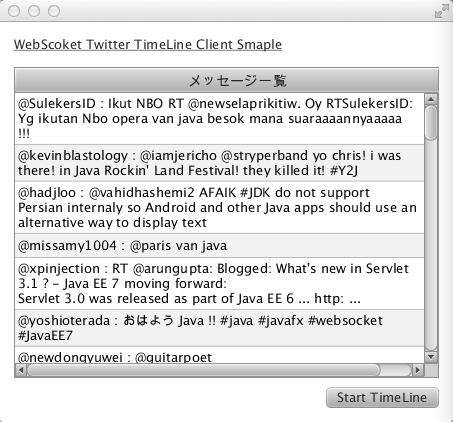
The example of running Application
Preparation :
In order to compile and run the application, you need following libraries.
* grizzly-framework-2.2.19.jar
* grizzly-http-2.2.19.jar
* grizzly-http-server-2.2.19.jar
* grizzly-websocket-2.2.19.jar
* tyrus-servlet-1.0-b08.jar

You can download the Grizzly related libraries from following site.
http://grizzly.java.net/nonav/docs/docbkx2.2/html/dependencies.html
* Grizzly is a popular NetWork Server framework which is wrote by Java NIO. And originally the grizzly was created for the server engine for GlassFish. It has high scalability and good performance. If you use the grizzly libraries, you don’t need to write the low level socket programing by Java.
In this client application, I will use the Grizzly to connect the WebSocket Server with less code.
Also, you need to get the jar file as tyrus-servlet (reference implementation of Java API for WebSocket) and it include the javax.net.websocket package. Please get the libraries from following site ?
http://repo1.maven.org/maven2/org/glassfish/tyrus/tyrus-servlet/1.0-b08/
Then I will start to create a NetBeans Project by selecting JavaFX FXML Application.

In this Project, I will specified the project name as “JavaFX-WebSocket”. After that in order to be able to use the downloaded libraries in the project,I configured and added the libraries to the project.
If the project had created successfully , following 3 classes will be created by NetBeans.
”JavaFXWebSocket.java”, ”Sample.fxml”, ”SampleController.java”.

I will try to update the above 3 classes as follows. At first , I will customize the view(FXML). If you already configured the SceneBuilder, you can show the SceneBuilder screen on your desktop after you click the Sample.fxml file on NetBeans Project.
This Sample Application is very simple. So I only change the size of the Window and added two component as Label and TableView. After drag and drop these component, I inserted the ID as “table” for TableView. And there is TableColumn inside of TableView. So I specified the ID as “column” for TableColumn.

If you change the screen, you may get the FXML code like follows.
<?xml version="1.0" encoding="UTF-8"?>

<?import java.lang.*?>
<?import java.util.*?>
<?import javafx.scene.*?>
<?import javafx.scene.control.*?>
<?import javafx.scene.layout.*?>

<AnchorPane id="AnchorPane" prefHeight="400.0" prefWidth="453.0" xmlns:fx="http://javafx.com/fxml" fx:controller="javafx.websocket.SampleController">
  <children>
    <Button fx:id="button" layoutX="326.0" layoutY="365.0" onAction="#handleButtonAction" text="Start TimeLine" />
    <Label fx:id="label" layoutX="126.0" layoutY="120.0" minHeight="16.0" minWidth="69.0" />
    <Label layoutX="14.0" layoutY="14.0" prefWidth="292.0" text="WebScoket Twitter TimeLine Client Smaple" underline="true" />
    <TableView fx:id="table" layoutX="14.0" layoutY="45.0" prefHeight="311.0" prefWidth="425.0">
      <columns>
        <TableColumn id="" maxWidth="445.0" prefWidth="445.0" text="Message List from Twitter" fx:id="column" />
      </columns>
    </TableView>
  </children>
</AnchorPane>
After customize the View, I will start to implement the Controller of JavaFX. For JavaFXWebSocket.java , there is no need to modify in this application. So I will use the NetBeans created code.
package javafx.websocket;

import javafx.application.Application;
import javafx.fxml.FXMLLoader;
import javafx.scene.Parent;
import javafx.scene.Scene;
import javafx.stage.Stage;

public class JavaFXWebSocket extends Application {

    @Override
    public void start(Stage stage) throws Exception {
        Parent root = FXMLLoader.load(getClass().getResource("Sample.fxml"));

        Scene scene = new Scene(root);

        stage.setScene(scene);
        stage.show();
    }

    public static void main(String[] args) {
        launch(args);
    }
}
I implemented the SampleController.java as follows. At first , I inserted the “@FXML TableView table” and “@FXML TableColumn column”. The field name is the same id of FXML(fx:id=”table”, fx:id=”column” ). And I implements the action of push the button on handleButtonAction method. Twitter Streaming is long running process. So I need to implement the check program as multi thread. At JavaFX ,javafx.concurrent.Service, javafx.concurrent.Task classes is prepared to implement the Task. So I had used the Service class to do it.
package javafx.websocket;

import java.net.URI;
import java.net.URISyntaxException;
import java.net.URL;
import java.util.ResourceBundle;
import java.util.concurrent.CountDownLatch;
import java.util.concurrent.TimeUnit;
import java.util.logging.Level;
import java.util.logging.Logger;
import javafx.concurrent.Service;
import javafx.concurrent.Task;
import javafx.event.ActionEvent;
import javafx.fxml.FXML;
import javafx.fxml.Initializable;
import javafx.scene.control.TableColumn;
import javafx.scene.control.TableView;
import javafx.scene.control.cell.PropertyValueFactory;
import javax.websocket.ClientEndpointConfiguration;
import javax.websocket.DefaultClientConfiguration;
import javax.websocket.DeploymentException;
import org.glassfish.tyrus.client.ClientManager;

public class SampleController implements Initializable {

    @FXML
    private TableView table;

    @FXML
    private TableColumn<RowData,String> column;

    @FXML
    private void handleButtonAction(ActionEvent event) {
        TwitterCheckService thread = new TwitterCheckService(table);
        thread.start();
    }

    @Override
    public void initialize(URL url, ResourceBundle rb) {
        table.setEditable(true);
        column.setResizable(true);
        column.setCellValueFactory(new PropertyValueFactory<RowData, String>("message"));
    }

    class TwitterCheckService extends Service {

        private TableView table;
        private CountDownLatch messageLatch = null;

        public TwitterCheckService(TableView table) {
            this.table = table;
        }

        @Override
        protected Task createTask() {
            Task<Void> task = new Task<Void>() {
                @Override
                protected Void call() throws Exception {
                    messageLatch = new CountDownLatch(1);
                    try {
                        URI clientURI = new URI("ws://localhost:8080/TwitterTimeLine/twitter");
//            ClientContainer cliContainer = ContainerProvider.getClientContainer();
                        ClientManager cliContainer = org.glassfish.tyrus.client.ClientManager.createClient();

                        ClientEndpointConfiguration clientConfig = new DefaultClientConfiguration();
                        cliContainer.connectToServer(new TwitterClient(table), clientURI);
                        messageLatch.await(1, TimeUnit.SECONDS);
                    } catch (DeploymentException | URISyntaxException | InterruptedException ex) {
                        Logger.getLogger(SampleController.class.getName()).log(Level.SEVERE, null, ex);
                    }
                    return null;
                }
            };
            return task;
        }
    }
}
In the above class, there is initialize() method to initialize the class. In the method, I wrote column.setCellValueFactory(new PropertyValueFactory(“message”)) . This is the value configuration of the Table column. In fact, the field of “message” in RowData class will be showed on every column in the Table. I specified the javafx.scene.text.Text type instead of String type, because it was difficult to manage the size of String in the Column of TableView. So instead of String, I used the Text and Text#setWrappingWidth could manage the size of viewable String.
package javafx.websocket;

import javafx.scene.text.Text;

public class RowData {

    private Text message;

    public RowData(Text message) {
        this.message = message;
        message.setWrappingWidth(400);
    }

    public Text getMessage() {
        return message;
    }

    public void setMessage(Text message) {
        this.message = message;
    }
}
I will pick up and explain the important point of WebSocket Client in SampleController class as follows. I wrote the comment in the code as “// ClientContainer cliContainer = ContainerProvider.getClientContainer();” In fact the above code is recommended as standard. And you should write the following property on the system property.
“webocket.clientcontainer.classname= actual class name ”
However in this programing , I faced the error. Thus I wrote the following in order to get the instance of ClientContainer. “ClientManager cliContainer = org.glassfish.tyrus.client.ClientManager.createClient();”
            URI clientURI = new URI("ws://localhost:8080/TwitterTimeLine/twitter");
//            ClientContainer cliContainer = ContainerProvider.getClientContainer();
            ClientManager cliContainer = org.glassfish.tyrus.client.ClientManager.createClient();

            ClientEndpointConfiguration clientConfig = new DefaultClientConfiguration();
            cliContainer.connectToServer(new TwitterClient(table), clientURI);
            messageLatch.await(20, TimeUnit.SECONDS);
I specified the “TwitterClient(table)” inside of cliContainer.connectToServer(new TwitterClient(table), clientURI) line. It is a WebSocket Client code which equal to the class of adding the @WebSocketEndpoint annotation at the server side. Instead of the “@WebSocketEndpoint” annotation, we must specify the “@WebSocketClient” annotation at the client side code. Following is the client side code of WebSocket client.
package javafx.websocket;

import javafx.collections.ObservableList;
import javafx.scene.control.TableView;
import javafx.scene.text.Text;
import javax.websocket.Session;
import javax.websocket.WebSocketClient;
import javax.websocket.WebSocketClose;
import javax.websocket.WebSocketMessage;
import javax.websocket.WebSocketOpen;

@WebSocketClient
public class TwitterClient {

    TableView table;
    ObservableList<RowData> list;

    public TwitterClient(TableView table) {
        this.table = table;
    }

    @WebSocketOpen
    public void onOpen(Session session) {
        System.out.println("Connection had opened.");
    }

    @WebSocketMessage
    public void onMessage(String message) {
        if (message.length() == 0) {
            return;
        }
        // In order to adjst the size of String in Table, I used Text.
        Text text = new Text(message);

        list = table.getItems();
        list.add(0,new RowData(text));
    }

    @WebSocketClose
    public void closeConnection(Session session) {
        System.out.println("Connection had closed.");
    }
}
Actually the code is very similar to the server side code. Instead of the @WebSocetEndpoint, I specified the @WebSocketClient annotation. And inside of the class, we can implements the method which is added @WebSocketOpen, @WebSocketMessage and @WebSocketClose annotation. In this program, client receive the message from the server. And there is no need to send the data to server. So I implemented the @WebSocketMessage public void onMessage(String message) method. In this method, the client receive the message from server and wrapping the String to Text object in order to adjust the length of the viewable String (Text text = new Text(message)). Finally the message is inserted into the first line of the Table.
This WebSocket client code is very easy to implement. So you can write the WebSocket program very easily not only server side but also Java Application like JavaFX.
Java EE 7 WebSocket Server-Side Programing with Twitter4J
In this entry, I will explain the new feature of Java EE 7. In Java EE 7, Java API for WebSocket (JSR-356) will be included.
I explained these technology at Japanese Java conference as follows. At that time, I showed the Twitter Timeline demo by using the WebSocket. So I will explain following how to create WebSocket application as standard technology of Java.

Now Java EE expert group is developing and evaluating the specification of JSR-356 Java API for WebSocket. So it may be possible to change the coding style when the Java EE 7 had released officially release at next year (We are planning to release the Java EE 7 at 2013 Spring). So please note this point ?
This program was created for GlassFish 4.0 b58 environment at November. You can download the promoted build of GlassFish v4.0 from following site. So please download it before the coding ?
http://dlc.sun.com.edgesuite.net/glassfish/4.0/promoted/
Latest version of the GlassFish was “glassfish-4.0-b67.zip”. (2012/12/20)
It seems that already the API had changed during this one month. Arun Gupta already mentioned about it on following entry.
WebSocket Samples in GlassFish 4 build 66 – javax.websocket.* package: TOTD #190
So if you get the latest version of the GlassFish, please refer to the above entry too?
And you need to get the “Twitter4J” libraries from following site before coding. Twitter4J. Twitter4J is very very useful libraries to create Twitter service by Java. Twitter4J is created by Japanese guyes whose name is Yusuke Yamamoto-san.
Actually I got two libraries as follows.
* twitter4j-core-2.2.6.jar
* twitter4j-stream-2.2.6.jar
Perhaps as you may know, WebSocket is able to communicate by Full duplex and bi-directional between Client and Server. And it is used the upgrade protocol of HTTP protocol as WebSocket protocol.
Once WebSocket connection had established, it is possible to write the program depends on the WebSocket lifecycle.
* Open (@WebSocketOpen)
* Receiving the Message (@WebSocketMessage )
* Error (@WebSocketError)
* Close (@WebSocketClose)
I will show the sample code of getting the Twitter Timeline as follows. At first, you need to specify the @WebSocketEndpoint annotation to the Java class. And you need to specify the context root in the argument of the annotation. For example, if you specify following,
@WebSocketEndpoint(value = “/twitter”) // since build 61
the client can connect to the server by using following
“ws://WEBSOCKET-SERVER/APP_NAME/twitter”.
And I implemented two method on the class as initOpen, closeWebSocket. And also I specified two annotation as @WebSocketOpen, @WebSocketClose.
* @WebSocketOpen initOpen : if the client access to the server, it inserted the Session to the Set(peers). Session has the information of RemoteEndpoint(client).
@ @WebSocketClose closeWebSocket : if the connection had cut, it delete the Session from the Set(peers). Session has the information of RemoteEndpoint(client).
package jp.co.oracle;

import java.io.IOException;
import javax.net.websocket.Session;
import javax.net.websocket.annotations.WebSocketClose;
import javax.net.websocket.annotations.WebSocketEndpoint;
import javax.net.websocket.annotations.WebSocketMessage;
import javax.net.websocket.annotations.WebSocketOpen;

@WebSocketEndpoint(path = "/twitter") // build 58
// @WebSocketEndpoint(value = "/twitter") build 61
public class TwitterWebSocket {

    @WebSocketOpen
    public void initOpen(Session session) {
        TwitterClientSingleton.peers.add(session);
    }

    @WebSocketClose
    public void closeWebSocket(Session session) {
        TwitterClientSingleton.peers.remove(session);
    }
}
Next, I created Twitter monitoring program by using Singleton EJB with Twitter4j lib. In this program, if the EJB received the new message from Twitter, the EJB automatically send the message to all of connected WebSocket Client. In the EJB, I had used the Streaming API of Twitter4J. And also I specified two annotation to the class as @Startup and @Singleton. Thus, the EJB will be automatically initialized and started the service by EJB Container when the application is started.
Once EJB had loaded, initTwitterStream() method will be called by container because @PostConstruct annotation is specified to the method. In the method, it initialized Twitter4J API and it is using the Twitter Stream API. And in this example, I specify the search keyword as “java”.
In the Twitter4J, StatusAdapter is provided and onStatus() method can receive the message when the above filter had matched. So I wrote the code of publishing the message to all of connected RemoteEndpoint in this method. Of course if you would like to write JSON, you can do it.
(* NOTE: If you would like to receive the message from client, you can write the method with @WebSocketMessage annotation.)
package jp.co.oracle;

import java.io.IOException;
import java.util.Collections;
import java.util.HashSet;
import java.util.Set;
import java.util.concurrent.Future;
import javax.annotation.PostConstruct;
import javax.ejb.Singleton;
import javax.ejb.Startup;
import javax.net.websocket.SendHandler;
import javax.net.websocket.SendResult;
import javax.net.websocket.Session;
import twitter4j.FilterQuery;
import twitter4j.Status;
import twitter4j.StatusAdapter;
import twitter4j.TwitterStream;
import twitter4j.TwitterStreamFactory;
import twitter4j.User;

@Startup
@Singleton
public class TwitterClientSingleton extends StatusAdapter {

    private static TwitterStream twStream = null;
    public static Set<Session> peers = null; // Session の Set (The information of the RemodeEndpoint is includedn in Session object)

    static {
        peers = Collections.synchronizedSet(new HashSet());
    }

    @PostConstruct
    public void initTwitterStream() {
        //Initialize the Twitter Stream of Twitter4J
        twStream = TwitterStreamFactory.getSingleton();
        FilterQuery filter = new FilterQuery();
        filter.track(new String[]{"java"});
        twStream.addListener(this);
        twStream.filter(filter);
    }

    @Override
    public void onStatus(Status status) {
        // when the filter had matched this code will be called
        User user = status.getUser();
        if (status.getUser().getLang().equals("ja")) {
            String resStr = "@" + user.getScreenName() + " : " + status.getText();
            try {
                // I send the message to all of connected client as sequencial
                for (Session peer : peers) {
                    peer.getRemote().sendString(resStr);
                }
            } catch (IOException ioe) {
                ioe.printStackTrace();
            }
        }
    }
}
Finally, I will write the View. This View is very very simple. So you can write simply HTML or JSF or other. However in this example, I will write as JSF faceless. In the program, if this client receive the Twitter message from Server, onMessage() of JavaScript is called and show the message on the first line of the HTML Table.
<?xml version='1.0' encoding='UTF-8' ?>
<!DOCTYPE html PUBLIC "-//W3C//DTD XHTML 1.0 Transitional//EN" "http://www.w3.org/TR/xhtml1/DTD/xhtml1-transitional.dtd">
<html xmlns="http://www.w3.org/1999/xhtml"
      xmlns:h="http://java.sun.com/jsf/html">
    <h:head>
        <title>Twitter TimeLine Sample</title>
        <meta http-equiv="Content-Type" content="text/html; charset=UTF-8"/>
        <title>Twitter TimeLine Sample</title>
        <style type="text/css">
            table,td,th {
                width: 700px;
                border-collapse: collapse;
                border: 1px black solid;
            }
        </style>

        <script language="javascript" type="text/javascript">
            var wsUri = "ws://localhost:8080/TwitterTimeLine/twitter";
            var websocket = new WebSocket(wsUri);
            websocket.onopen = function(evt) { onOpen(evt) };
            websocket.onmessage = function(evt) { onMessage(evt) };
            websocket.onerror = function(evt) { onError(evt) };

            var  numberOfMessage;

            function init() {
                numberOfMessage = 0;
            }
            function onOpen(evt) {
                ;
            }

            function onMessage(evt) {
                writeToScreen(evt.data);
                numberOfMessage++;
            }

            function onError(evt) {
                writeToScreen('<span style="color: red;">ERROR:</span> ' + evt.data);
            }


            function writeToScreen(messages) {
                var table = document.getElementById("TBL");
                var row = table.insertRow(0);
                var cell1 = row.insertCell(0);

                var textNode = document.createTextNode(messages);

                var z = numberOfMessage%2;
                if(z==1){
                    cell1.style.backgroundColor="#ADD8E6" ;
                }
                cell1.appendChild(textNode);
            }

            window.addEventListener("load", init, false);
        </script>
    </h:head>
    <h:body>
        <h2>Twitter Time Line <BR/>WebSocket Sample Application!!</h2>
        <TABLE BORDER="1" ID="TBL">
        </TABLE>
    </h:body>
</html>
In order to run the Application, You need to get the consumer key and access Token from Twitter. http://twitter.com/oauth_clients/new After created the consumer key and access token, you need to write the following properties on twitter4j.properties file. And please placed the properties file to WEB-INF/classes ?
| # To change this template, choose Tools | Templates # and open the template in the editor. debug=false oauth.consumerKey=********************* oauth.consumerSecret=**************************************** oauth.accessToken=********-**************************************** oauth.accessTokenSecret=****** |
And also you need the following libraries to compile and run.
* Twitter4J: twitter4j-core-2.2.6.jar
* Twitter4J: twitter4j-stream-2.2.6.jar
* WebSocket: tyrus-servlet.jar (GlassFish-INSTALL/glassfish/modules)
* EJB : (GlassFish-INSTALL/glassfish/modules)
* CDI : (GlassFish-INSTALL/glassfish/modules)
I will show the directory structure of NetBeans project as follows.

Finally :
Perhaps you can understand that the Java API for WebSocket API is very very easy to use. And also if you use the Singleton EJB , it is very useful to monitor the backend service.
For example, please consider the DataBase monitoring instead of Twitter. If client request the DB update information to the Application Server, the Application Server will send the query to DB server for every individual request until now. However if you create the DB monitoring application like this, the load of DB may be extremery decrease.
Following is the demo video of this sample application.
WebSocket is the key technology included in the Java EE 7. And it is very easy to implement. If you are interested in the WebSocket on Java Platfor, please try to use the NetBeans and GlassFish v4.


 寺田 佳央 - Yoshio Terada